
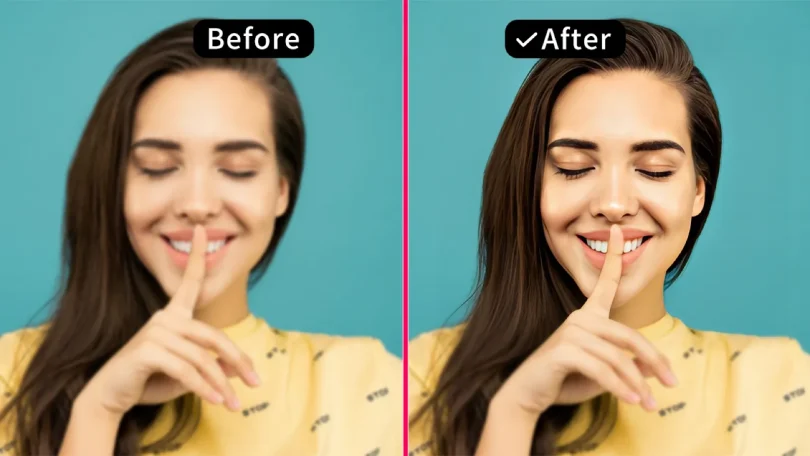

In the age of high-resolution displays and social media, image quality matters more than ever. Whether you’re restoring old family photos, enhancing portraits, or improving product images, blurry or low-resolution pictures can be a major drawback.
Fortunately, AI-powered face enhancers and image upscalers can transform low-quality photos into stunning, high-definition images with just a few clicks. These tools use deep learning algorithms to sharpen details, smooth skin, restore facial features, and even upscale images without losing quality.
In this guide, we’ll explore how AI face enhancers work, their benefits, and how you can use them to improve your photos effortlessly.
Contents
Why Do Photos Lose Quality?
Before diving into AI solutions, it’s important to understand why photos degrade in the first place. Common causes include:
- Low-resolution cameras – Older smartphones or budget cameras capture fewer details.
- Poor lighting – Dim or uneven lighting can introduce noise and blur.
- Compression artifacts – Uploading images to social media or websites reduces quality.
- Motion blur – Moving subjects or shaky hands can soften details.
- Aging and damage – Old printed photos may fade, scratch, or lose sharpness over time.
Traditional editing tools like Photoshop can help, but they require skill and time. AI-powered enhancers automate the process, delivering professional results in seconds.
How AI Face Enhancers Work
AI face enhancers use deep learning models trained on millions of high-quality images. When you upload a photo, the AI:
- Detects faces and key features – Identifies eyes, nose, mouth, and skin texture.
- Sharpens details – Enhances fine lines, eyelashes, and hair strands.
- Reduces noise and blur – Cleans up graininess and motion blur.
- Smooths skin naturally – Retains texture while removing blemishes.
- Upscales resolution – Increases image size without pixelation.
Unlike manual editing, AI ensures natural-looking results without over-processing.
Best Uses for AI Face Enhancers
AI face enhancement isn’t just for selfies—it has a wide range of applications:
1. Restoring Old Photos
Vintage portraits often suffer from fading, scratches, or low resolution. AI can restore facial details, colorize black-and-white images, and bring old memories back to life.
2. Enhancing Portrait Photography
Professional photographers can use AI to refine skin tones, brighten eyes, and add depth to portraits without hours of retouching.
3. Improving Social Media Photos
Blurry or poorly lit selfies can be instantly enhanced for Instagram, LinkedIn, or dating profiles.
4. Fixing Group Photos
If only one person in a group shot is blurry, AI can selectively enhance their face while keeping the rest of the image intact.
5. Upscaling Low-Res Images
AI can enlarge images while preserving sharpness—ideal for printing or digital displays.
How to Enhance Faces and Upscale Photos with AI
Using an AI face enhancer is simple:
Step 1: Upload Your Image
Most tools accept JPG, PNG, or WebP files. Simply drag and drop your photo.
Step 2: Let AI Process the Image
The tool automatically detects faces, enhances details, and upscales resolution (if needed).
Step 3: Preview and Download
Compare the before-and-after results, then download the enhanced version.
No manual adjustments are required—AI does all the work in seconds.
AI vs. Manual Editing: Which Is Better?
| Feature | AI Face Enhancer | Manual Editing (Photoshop) |
| Speed | Instant (seconds) | Time-consuming (minutes to hours) |
| Skill Required | None | Advanced editing knowledge needed |
| Consistency | Uniform results across multiple images | Varies based on editor’s skill |
| Detail Recovery | Restores lost facial features effectively | Limited by original image quality |
| Cost | Free or low-cost | Requires expensive software |
For most users, AI provides the best balance of quality and convenience.
Try Upscale.Pro for High-Quality Face Enhancement
If you’re looking for a reliable AI face enhancer, Upscale.Pro offers advanced facial restoration and image upscaling. Its AI analyzes each photo to:
✔ Sharpen eyes, teeth, and facial contours
✔ Smooth skin while preserving natural texture
✔ Upscale images up to 4K without losing quality
✔ Remove noise and compression artifacts
Best of all, it’s free for basic use—no watermarks or sign-up required.
Conclusion
AI face enhancers and upscaling tools have revolutionized photo editing, making it possible to restore, sharpen, and enlarge images with just one click. Whether you’re reviving old memories, improving portraits, or preparing images for print, AI delivers professional results without the complexity of manual editing.
For a fast, free, and high-quality solution, try Upscale.Pro’s AI Face Enhancer and see the difference for yourself. Upload your photo today and get a stunning, high-definition version in seconds!