
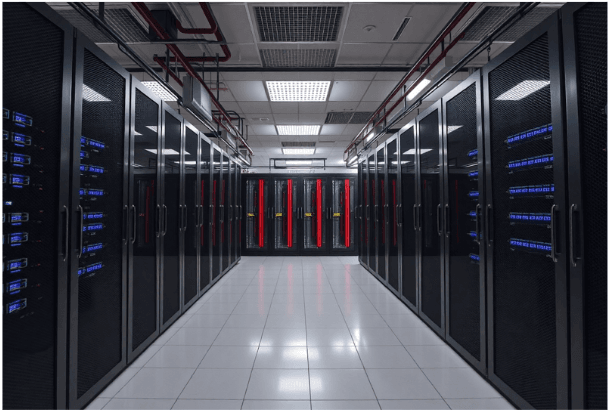

Your own hardware without the hassle of managing cooling, backup power, or 24/7 physical security. Data center colocation gives companies full control over their IT infrastructure without the astronomical costs of running an in-house server room. If you want to keep the freedom to choose your own technologies while sleeping well knowing your servers operate in a secure, high-availability environment, read on. Here, we’ll explain what colocation is, how it works, and when it becomes the ideal solution.
Servers you own, without having to build a digital fortress around them. Professional-grade infrastructure without the need to employ a full team of technicians. This is exactly what the model we are about to break down in detail offers.
Contents
- 1 What Is Colocation and How Does Leasing Space in a Data Center Work?
- 2 What Is Colocation from a Process Perspective—How Deployment Works
- 3 Who Benefits from Colocation and When to Consider It
- 4 Security and Availability—What to Expect from Colocation
- 5 Moving to Colocation Doesn’t Have to Be a Leap Into the Unknown
What Is Colocation and How Does Leasing Space in a Data Center Work?
Colocation (often shortened to “colo”) is a service in which a company rents space for its own servers and networking equipment in a professional data center. Unlike cloud services, the organization keeps full ownership of its hardware and makes its own decisions regarding brands, configurations, and technical parameters. The provider of data center colocation delivers not only the facility itself but also cooling, redundant power, internet connectivity, and physical security. The company brings its racks, servers, and switches, connects them, and from that moment on operates in an environment it could hardly build on its own at a reasonable cost.
Space can be rented in different ways—by rack, by cabinet, by a fenced cage with a lockable gate, or even by an entire room for larger organizations. Many colocation data centers have expanded their offerings with managed services such as managed connectivity, backup solutions, or even assistance with hardware configuration changes. The core principle, however, remains the same: you pay for floor space or rack space, electricity, and bandwidth, and everything else is yours.
Comparison – Own Data Center vs. Colocation vs. Public Cloud
| Category | Own Data Center | Colocation | Public Cloud |
| Capital expenditures | Very high (building, infrastructure) | Low (hardware only) | None (pay-as-you-go) |
| Hardware | Owned, full control | Owned, full control | Rented, limited control |
| Operational responsibility | All handled internally (power, cooling, security) | Hardware and software only | Minimal (manage only data and applications) |
| Scalability | Slow, requires investment | Faster, limited by data center capacity | Immediate and virtually unlimited |
| Physical security | Self-managed | Guaranteed by provider | Guaranteed by provider |
| Monthly costs | High (energy, staff, maintenance) | Medium (rent, energy) | Variable (usage-based) |
What Is Colocation from a Process Perspective—How Deployment Works
The process begins with choosing a provider and a specific data center, where geographic location plays a crucial role due to latency and regulatory requirements. The company reviews the Service Level Agreement (SLA), which defines guaranteed availability, cooling parameters, and technical support response times. This is followed by transporting the company’s own equipment to the facility, where technicians handle the physical installation in the assigned space, connection to redundant power distribution, and integration into the network infrastructure.
Modern colocation centers offer remote access for managing individual devices and real-time monitoring of energy consumption. If a server fails or you need to replace a hard drive, you have two options:
- You can visit the site personally (most data centers require prior visit registration and biometric authentication).
- Or you can use a remote hands service, where on-site technicians perform physical interventions according to your instructions. For routine maintenance such as restarting a server, replacing a disk, or adding a cable, this service saves both time and travel costs, especially if the data center is located hundreds of kilometers away.
Who Benefits from Colocation and When to Consider It
Data center colocation services are useful across a wide range of businesses:
- Startups with increasing performance demands gain scalability without having to think about generators or UPS units.
- Companies with regulatory requirements value the ability to keep data on their own drives within a certified environment.
- Financial institutions and healthcare organizations choose colocation because of its combination of control and compliance.
- Even cloud service providers themselves use colocation centers to quickly expand capacity. Instead of building a new data center for hundreds of millions, they simply deliver additional racks into rented space.
The ideal scenario for colocation occurs when a company needs high performance, has special hardware requirements (such as GPU clusters for machine learning), or operates legacy systems that cannot be migrated to the cloud. It is not cost-effective for very small businesses with minimal performance needs—for them, the cloud is usually the more economical option. Organizations that require frequent physical modifications to their infrastructure should also factor in technician travel costs or remote hands service fees.
Security and Availability—What to Expect from Colocation
Professional colocation data centers build security on multiple layers. Physically, this means biometric scanners, 24/7 security cameras, on-site guards, and similar protective measures. Operationally, these facilities guarantee availability according to tier classifications—a Tier IV data center can withstand a commercial power outage for 96 hours on diesel generators, while Tier III can handle 72 hours.
SLA agreements define not only percentage availability (for example, “five nines,” meaning 99.999%) but also technical support response times and compensation for outages. It is important to verify what the availability guarantee actually includes—some data centers guarantee the availability of power and cooling, but not the functioning of your own hardware.
Energy-consumption monitoring through metrics such as Power Usage Effectiveness (PUE) shows how efficiently the facility manages electricity—a lower PUE indicates a more environmentally friendly operation and often lower costs.
Moving to Colocation Doesn’t Have to Be a Leap Into the Unknown
The answer to the question “What is colocation for your company?” depends on your specific needs: it is infrastructure built to standards that would cost multiples of the investment if you created it yourself. Your hardware remains yours, and so does control over your data—the only thing that changes is the address where your servers are located. Instead of watching thermometers and diesel tanks, your technicians can focus on what they do best.
Sources:
- https://www.techtarget.com/searchdatacenter/definition/colocation-colo
- https://www.hpe.com/cz/en/what-is/data-center-colocation.html