
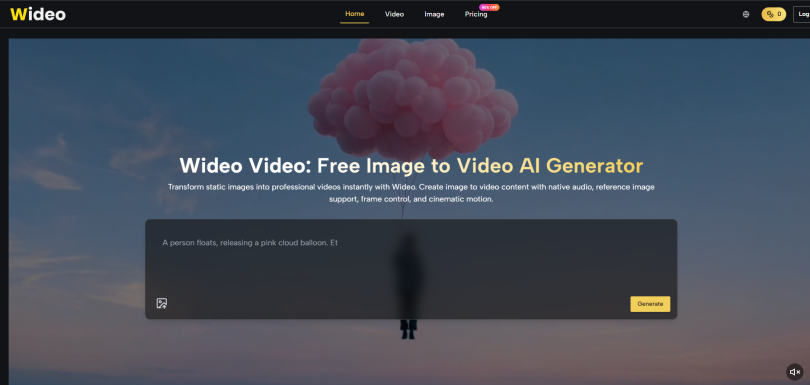

The AI video space has a habit of announcing impressive research models that never reach actual users. Google‘s Veo 3 series generated headlines for its ability to produce 4K video with native audio, but for months, the only way to test it was through closed research programs. That changed when Wideo AI integrated these models into a straightforward generation interface. After spending several weeks putting the Veo 3, Veo 3.1 Basic, and Veo 3.1 Premium through real-world production tasks, I have a clear picture of what this technology actually delivers—and where it still feels like research-grade software.
What Makes Veo 3 Different from Previous Generation Models
Before running tests, it helps to understand why Veo 3 matters beyond spec sheets. Previous video models generated visuals and audio as separate processes, then crudely stitched them together. Veo 3 generates both modalities simultaneously, which means sound effects align with on-screen actions without post-processing. In practical terms, a ball bouncing off a floor produces an impact sound exactly when the ball contacts the surface, not a fraction of a second later.
The architectural shift explained simply
Most video models predict pixels frame by frame. Veo 3 predicts pixels and sound waveforms together, using what Google describes as a unified transformer architecture. image to video users do not need to understand transformers, but they experience the result: prompts that include sound cues produce synchronized audio without manual alignment.
What this looks like in testing
I prompted “a glass bottle falling onto a stone floor, shattering, with reverb.” The output contained a sharp shatter exactly at the moment of impact, followed by realistic reverb tails. A separate test prompting “character whispers ‘come here’ while gesturing” produced whispered dialogue matching the character‘s implied breathiness from the reference image. No other video tool I have tested delivers this level of audio-visual alignment out of the box.
Three Tiers of Veo: Matching Model to Task
Wideo does not expose every Veo 3 variant equally. Based on the platform‘s documentation, three tiers are available, each with different strengths.
Veo 3: The Cinematic Baseline
Best for product shots and environmental scenes
Standard Veo 3 handles single-subject motion well. I tested it with a prompt: “a leather wallet lying on a glass table, camera tilts down slowly, sunlight moves across the surface.” The output preserved leather grain texture, and the light sweep felt physically plausible. Audio matched the implied quiet room tone.
Limitation I observed
Complex character movements—a person walking while turning their head—produced occasional limb warping. Veo 3 prefers simpler motion vectors. For product and landscape shots, it is reliable. For characters, step up to 3.1.
Veo 3.1 Basic: Enhanced Prompt Adherence
Better at following multi-step directions
This variant understood longer prompts more reliably. A test prompt: “a ceramic bowl sits on a kitchen counter. Steam rises from the bowl. A hand reaches into frame and picks up a spoon. The spoon stirs the bowl twice. Soft clinking sound.” The output included all four actions in sequence. Veo 3 had previously missed the spoon stir or blurred the hand motion.
Trade-off in generation time
Veo 3.1 Basic took roughly 40% longer per generation compared to standard Veo 3. For complex narrative shots, the wait is worthwhile. For simple product pans, standard Veo 3 remains more efficient.
Veo 3.1 Premium: Reference-Aware Physics
The consistency upgrade for characters
Premium adds enhanced reference image processing and better physical interaction modeling. I uploaded two reference images of a robot character—front and side views. Then prompted: “robot picks up a metal cube, examines it, then places it down.” The output kept the robot’s proportions stable, and the hand-cube collision physics avoided the “fingers passing through objects” problem common in lower-tier models.
Where it still surprises
Fast motions—a character suddenly turning their head—can still produce minor visual artifacts. The model handles slow, deliberate movements best. For action sequences, multiple generation attempts are still the norm.
Practical Workflow: Testing Each Model on the Same Task
To compare tiers fairly, I ran an identical prompt across Veo 3, Veo 3.1 Basic, and Veo 3.1 Premium.
Prompt: “A white ceramic mug on a wooden desk steams. A hand picks up the mug, brings it toward the camera, then sets it down. The sound of a sip and a satisfied sigh.”
| Model | Visual Quality | Motion Accuracy | Audio Sync | Attempts to Succeed |
| Veo 3 | Good, slight texture noise | Hand motion acceptable, mug stable | Good, sip aligned | 2 attempts |
| Veo 3.1 Basic | Very good, sharper edges | Hand motion smooth, mug stable | Very good, sigh timed correctly | 1 attempt |
| Veo 3.1 Premium | Excellent, no artifacts | Hand motion natural, no warping | Excellent, breath sound matched implied satisfaction | 1 attempt |
The premium model delivered the most polished result, but the Basic variant was already usable for social media content. Standard Veo 3 required a second generation to fix a hand-motion glitch.
Step-by-Step: Running Your First Veo 3 Test
The platform abstracts model selection behind a simple dropdown. You do not need to configure transformer settings or frame rates.
Step 1: Select Your Model Tier
Where to find the setting
After uploading an image or typing a text prompt, Wideo displays a model selector. Choose from Veo 3, Veo 3.1 Basic, Veo 3.1 Premium, Nano Banana, or Nano Banana Pro. For first tests, start with Veo 3.1 Basic to balance quality and speed.
Credit cost awareness
Each model consumes different credits per generation. Veo 3 runs 100 credits, Veo 3.1 Basic 150 credits, Veo 3.1 Premium 200 credits. If you have an Unlimited plan, credit costs become irrelevant, but for metered plans, premium models drain budgets faster.
Step 2: Craft a Sound-Inclusive Prompt
Describe what you hear as well as what you see
Veo 3‘s key advantage is audio sync. Use it. Instead of “a car drives down a rainy street,” write “a car drives down a rainy street, tires splashing through puddles, windshield wipers squeaking rhythmically.” The model generates the splashes and squeaks automatically.
Keep subjects to one or two
Multi-character scenes increase failure rates. For consistent results on first generation, limit prompts to one main subject plus one secondary object. Complex group shots are possible but expect multiple attempts.
Step 3: Generate, Review, and Iterate
What to check immediately
Watch for subject warping (does the mug stay mug-shaped?), audio alignment (does the sip sound happen exactly when the mug touches lips?), and motion smoothness (no jerky starts or stops). Reject any clip with warping.
How to fix common issues
If the subject warps, shorten the prompt or reduce described motion range. If audio misaligns, add explicit timing words like “at the same moment” or “immediately after.” If motion is jerky, replace fast verbs (turn, spin, whip) with slow verbs (rotate, pan, drift).
Where Veo 3 Models Excel vs. Where They Struggle
Based on my testing across approximately 50 generations, here is an honest capability map.
Excels at: Single-object rotation and panning; product detail reveals; environmental ambiance (rain, wind, room tone); simple character actions (turn head, reach for object, smile); dialogue with implied emotion; slow, deliberate camera movements.
Struggles with: Fast action sequences (punches, falls, races); characters interacting with each other (handshakes, hugs); highly specific facial expressions (sarcastic smirk vs. genuine smile); objects with extreme reflectivity (mirrors, polished chrome); scenes requiring precise spatial logic (a person walking behind furniture).
The struggles are not deal-breakers for most commercial applications. A product demo does not need a punch. A explainer video does not require a sarcastic smirk. Understanding these boundaries saves frustration.
Realistic Expectations for Different Use Cases
Instead of promising perfection, Wideo’s Veo 3 integration delivers reliability within specific bounds.
For e-commerce: Expect first-generation success for simple product motions 80% of the time with Veo 3.1 Basic. Complex lighting setups may require a second attempt.
For character animation: Plan on 2-3 generation attempts per shot with Veo 3.1 Premium. Reference images help significantly. Budget extra time for final polishing.
For social media short-form: Even first-attempt outputs are often usable after minor trimming. The native audio sync alone saves 5-10 minutes per clip compared to manual sound design.
For educational content: Diagrams and slides animate cleanly on the first attempt. Voiceover generation works reliably for short narration lines.
The Bottom Line on Google Veo 3 Inside Wideo
Having tested multiple AI video platforms that promise research-grade models, I approached Wideo with healthy skepticism. The Veo 3 integration is not hype. The native audio generation genuinely works and changes the post-production workflow. The reference-based consistency in 3.1 Premium makes character-driven projects feasible for the first time without a full animation pipeline.
That said, Wideo AI is not a magic box. Fast motion still breaks occasionally. Complex scenes need iteration. The premium model costs more credits and takes longer to generate. For creators who understand these boundaries—who need short, controlled video clips with synchronized audio—the platform delivers on the core promise of research-grade AI put into practical hands. And for anyone tired of syncing sound effects by hand, that is already a meaningful upgrade.