
AI video write-ups keep repeating the same pitch: one login, many models. Kling for realism. Runway for a cut. Hailuo, Vidu, Luma, Pika, PixVerse, Sora — pick a flavor, paste a prompt, download an eight-second clip. That menu is useful when the job is a clip. It is the wrong menu when the job is a launch.
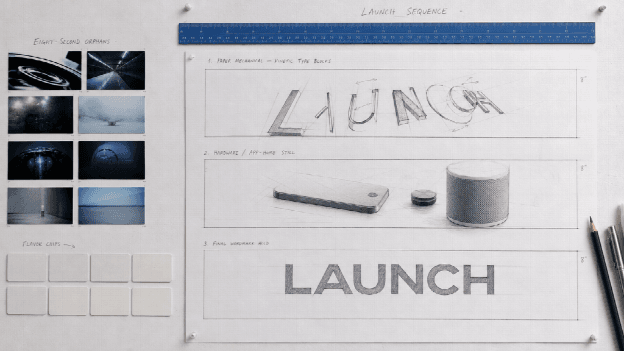
A product launch is not “make this still breathe.” It is a sequence: what the thing does, how the type lands, how the interface or the hardware stays recognizable, how the last seconds hold for a URL. After Effects can do that if you have a motion designer and a week. A Kling/Runway aggregator will happily give you cinematic fog and a bottle that is no longer yours.
This article is not another tour of text-to-video, image-to-video, and kiss templates. It is the job those roundups skip: online motion graphics for a product story, without a timeline.
Contents
Access to a motion system, not a model buffet
The defining feature of a multi-model maker is choice of weights. The defining feature of a launch film is choice of direction: kinetic type, UI rhythm, hardware reveal, logo sting. Those are design systems, not model names.
Motion Studio is Topview’s online motion-graphics studio for that brief. You describe what you need to communicate, upload product or interface stills, and pick a visual style, duration, and aspect ratio. AI video models plus motion-design skills handle pacing, typography, transitions, and the details that should still look like the SKU — without keyframes and without After Effects.
It is a studio, not a Kling clone and not a Runway skin. Do not rank it against a nine-model picker as if they were the same purchase.
The product copy puts length in the 4–60 second range and six frames: 21:9, 16:9, 4:3, 1:1, 3:4, 9:16. The live panel may show a slightly different slider. Confirm it. Templates (product launch, kinetic typography, logo animation) are still a preview library. Do not write native 4K into a brief the exporter does not show.
From a sentence, not from a prompt-off
Multi-model tools sell “type anything.” Launch teams already know the sentence: new dashboard, new grip, new pricing page. Motion Studio starts there — message, scenes, tone — and builds a complete sequence instead of five disconnected generations that disagree about the room.
Write it like a slide, not a vibe. “Open on the same app home from the still. Feature row, then a hold for the wordmark. No extra UI chrome, no second device.” If you only say “cinematic SaaS,” you will get someone else’s office.
From the still you already paid for
Image-to-video on an aggregator animates a picture. Launch motion has to animate this product. Upload packshots, UI screens, brand boards (JPG/PNG, about 15 MB per file on the current page). Those references are supposed to keep composition, color, and the recognizable bits stable from scene to scene.
If two photos are two colorways, pick one. A prettier clip that mutates the button layout is a trust tax on a product page.
Templates that are launch language, not novelty effects
Guest posts in this genre often pad the middle with hug, squish, Venom, and superhero face swaps. That is entertainment. It is not a website hero.
Motion Studio’s useful middle is the other library: product-and-interface systems, brand-and-cinematic reveals, kinetic type. Use a template when you need a motion language in an afternoon. Describe a custom direction when the launch has its own texture, lighting, and pacing. Either way, the unit of work is the whole video, not a sticker on a clip.
One idea, six placements
Kling and Runway clips usually leave the crop as an afterthought. A launch has to live on a site, a deck, and a story.
Set the ratio before you generate. Ultrawide for a homepage. 16:9 for a pitch. 9:16 for the paid vertical. Keep the same product sentence; change the frame. That is closer to how a real campaign is art-directed than “export whatever the model defaulted to.”
Who this is for (and who should stay on a model picker)
Stay on a multi-model maker when you need a style transfer, a character test, or a one-off social gag.
Use a motion studio when you are shipping:
- An app or SaaS feature announcement
- A hardware reveal that has to match the photo
- A website hero that cannot be a stock drone
- A crowdfunding or internal pitch that has to explain the object in under a minute
After Effects still wins if you need frame-level masks and a compositor in the room. Motion Studio is the pass you run before you hire that room — or instead of it, when the brief is a directed launch, not a VFX plate.
A short working order
- Freeze the claim. Legal stays human.
- Pack three non-conflicting stills.
- Name the placement and the seconds.
- Generate once. Inspect the label and the chrome at the midpoint.
- Finish captions and a poster in an editor. Mute autoplay only if the words are on screen.
If a take fails, change one variable — a tighter still, a negative (“no extra icons”), a shorter interval — not the entire aesthetic.
Conclusion
Unleashing creativity with Kling, Runway, and a dozen other models is a real category. It answers “which weights today.” It does not answer “does this still look like our launch.”
Motion Studio is the studio for that second question: product-centered motion graphics online, in the lengths and frames a campaign actually uses, without a keyframe timeline. Keep the model buffet for experiments. Send the launch to a desk that was built for the story, not for the menu.